AsanReview · Features
Everything AsanReview does to get you found first on Google Maps
From the review request to the reply, the post and the ranking report.
Free plan, no cardJazzCash · EasypaisaRoman Urdu · Urdu · English
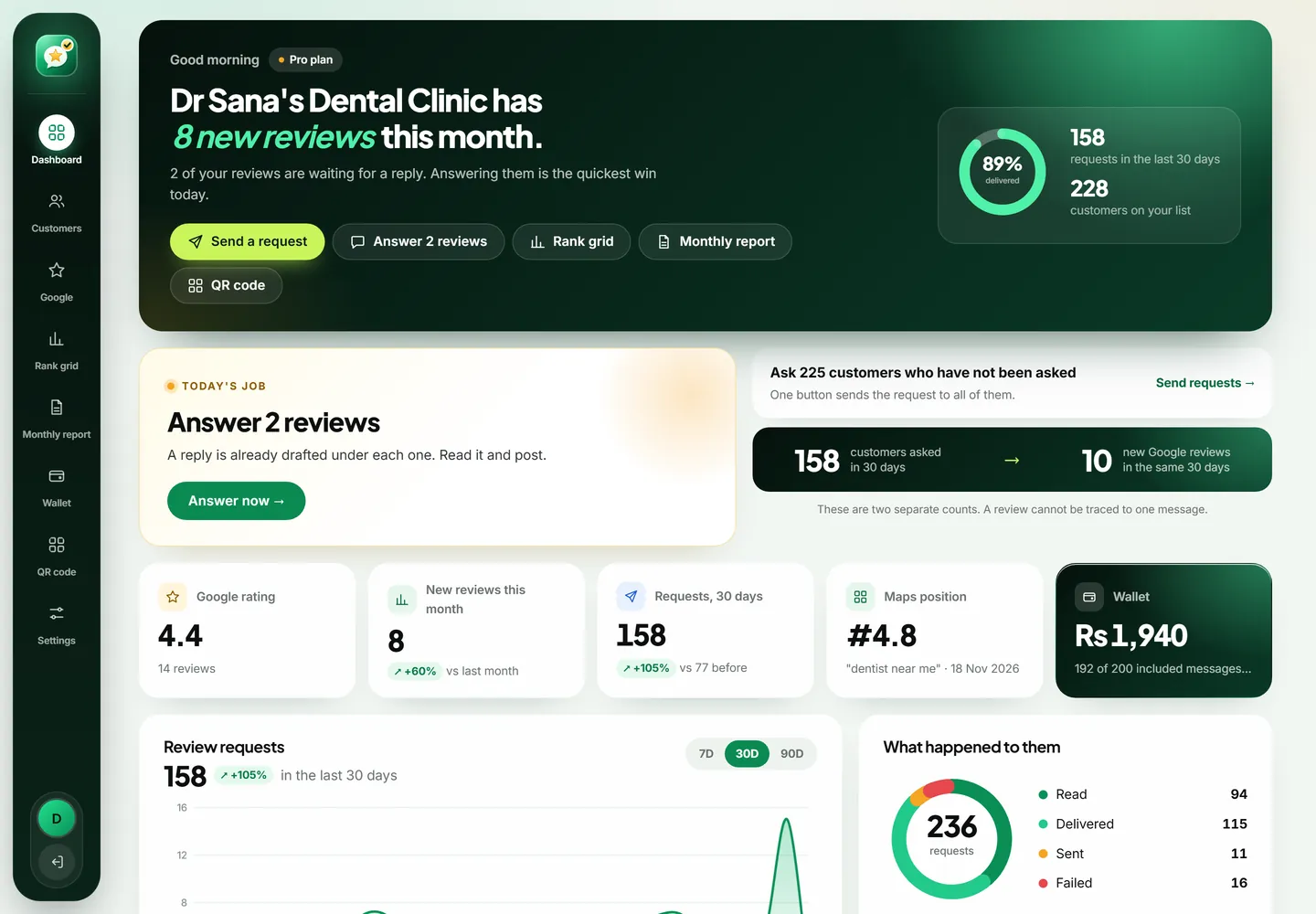
WhatsApp review requests
Your Google review link reaches each customer on WhatsApp, in their language.
Read more →AI review replies
Every new Google review gets a reply in your tone. You approve, or let good ones go out alone.
Read more →Automatic Google posts
Fresh posts every week, each with the best photo from your own library.
Read more →Google Maps rank grid
See your position on Maps from every side of your area, and who is above you.
Read more →Agency and white label
Up to 10 locations, one wallet, and reports under your own brand.
Read more →Features at a glance
- WhatsApp review requests
- To ask for Google reviews on WhatsApp, add the customer's name and mobile number in AsanReview and press send. The customer receives a short message with your Google review link; one tap opens the review box. On the Free plan the message opens in your own WhatsApp. On paid plans it is sent automatically.
- AI review replies
- AsanReview connects to your Google Business Profile, checks for new reviews about every 20 minutes, and uses AI to write a reply for each one. You can approve every reply before it is published, or set rules so that 4 and 5 star reviews are answered automatically while low ratings wait for you.
- Automatic Google posts
- AsanReview publishes posts on your Google Business Profile on a schedule: one a week on Starter, three a week on Pro, and daily on Agency. For each post the AI first picks a fitting photo from the library you uploaded, then writes 150 to 300 characters about that topic. You can approve posts first or let them publish automatically.
- Google Maps rank grid
- A rank grid (also called a geogrid) checks a keyword on Google Maps from a grid of points around a business, for example 5 × 5 points placed 1 km apart, and records the business's position at each point. AsanReview shows the grid on a map with average position (ATRP), average position where found (ARP), share of top-3 results (SoLV) and the competitors that rank above you.
- Agency and white label
- The AsanReview Agency plan lets one account manage up to 10 business locations. Each location has its own customers, Google Business Profile, AI replies, posts and rank grid; all of them share the agency's wallet. Monthly reports and rank reports show the agency's brand name instead of AsanReview.
What each feature does, in plain words
WhatsApp review requests are the starting point. You add a customer's name and mobile number, or upload an Excel sheet, and AsanReview prepares a short message with your Google review link. On the Free plan it opens in your own WhatsApp and you press send. On paid plans it is sent for you, and you can see whether each message was delivered and read.
AI review replies begin once your Google Business Profile is connected. About every twenty minutes AsanReview checks for new reviews and drafts an answer to each one in the tone of an owner, not a call centre. You approve the drafts, or let four and five star reviews be answered automatically while low ratings wait for you.
Automatic Google posts keep the profile fresh. Each week the AI picks a photo from the library you uploaded, writes a short post about one of your services, and either waits for your approval or publishes it.
The Google Maps rank grid measures the result. It searches your keyword from a grid of points around your business and shows your position at each one on a map, along with the competitors ranking above you and what they have that you do not.
Agency tools put all of this for up to ten locations under one login and one wallet, with reports that carry your own brand name.
How the pieces fit together
It helps to think of your Google profile the way a customer sees it. First they notice the rating and the number of reviews. Then they read two or three reviews and glance at how the owner replied. Then they look at the photos and anything recent. All of that takes under a minute, and it decides whether they call you or the next business.
Requests raise the number and keep it recent. Replies shape what a reader concludes from the reviews. Posts and photos fill in the rest. The rank grid sits outside that minute: it tells you how often you are being shown in the first place, and where. Working on one piece helps. Working on all four is what moves a business from being one of the options to being the obvious one.
What you need to get started
For review requests: a Google review link and your customers' mobile numbers. That is all, and it is enough for the Free plan.
For replies and posts: a verified Google Business Profile that you can sign in to, a few lines describing your business, and some real photos.
For the rank grid: the keyword your customers search for and a pin in the right place, which AsanReview sets for you from your profile and lets you correct on a map.
You do not need a website, a laptop, a credit card or any marketing knowledge. Most owners set up from their phone in the time it takes to drink a cup of tea.
What AsanReview deliberately does not do
It does not sell reviews, write fake ones, or offer customers anything in exchange for a review. Those practices break Google's policies and put the whole profile at risk.
It does not ask only your happy customers. Everyone is asked the same way, which is both what Google requires and what makes a set of reviews believable.
It does not promise a ranking. Nobody honest can. It gives you the routine that works and a map that shows whether it is working for you.
One tool for the whole job
A local business looks good on Google when four things happen regularly: customers are asked for reviews, reviews get an answer, the profile shows something new, and the owner knows where the business stands on the map. Most owners manage one of these in a good month. AsanReview is built so that all four happen every week with a few minutes of attention.
Each feature works alone, and they are stronger together. Requests bring reviews. Replies make those reviews work harder. Posts keep the profile alive between reviews. The rank grid tells you whether any of it is moving your position, and where to push next.
Start with one, add the rest later
You do not have to switch everything on at once. Nearly everyone begins with WhatsApp review requests on the Free plan, because it needs nothing but a customer's name and number. When reviews start to arrive, connecting your Google Business Profile adds AI replies and weekly posts. The rank grid comes last, when you want proof that the effort is paying off.
Built for how businesses here actually work
Messages in Roman Urdu, Urdu and English. Payment by JazzCash, Easypaisa or bank transfer, in rupees, with a prepaid wallet instead of a card on file. Excel upload for the customer sheet you already keep. A phone-first screen your staff can use at the counter. And an install button, so it sits on the home screen like any other app.
Features
Your next customer is reading reviews right now. Ask the ones you served today, in one tap. The Free plan has no card and no time limit.