AsanReview feature
Every Google review answered with AsanReview, in your own tone
Customers and Google both notice when an owner answers reviews. AsanReview reads each new review on your Google Business Profile and drafts a reply that sounds like you.
Free plan, no cardJazzCash · EasypaisaRoman Urdu · Urdu · English
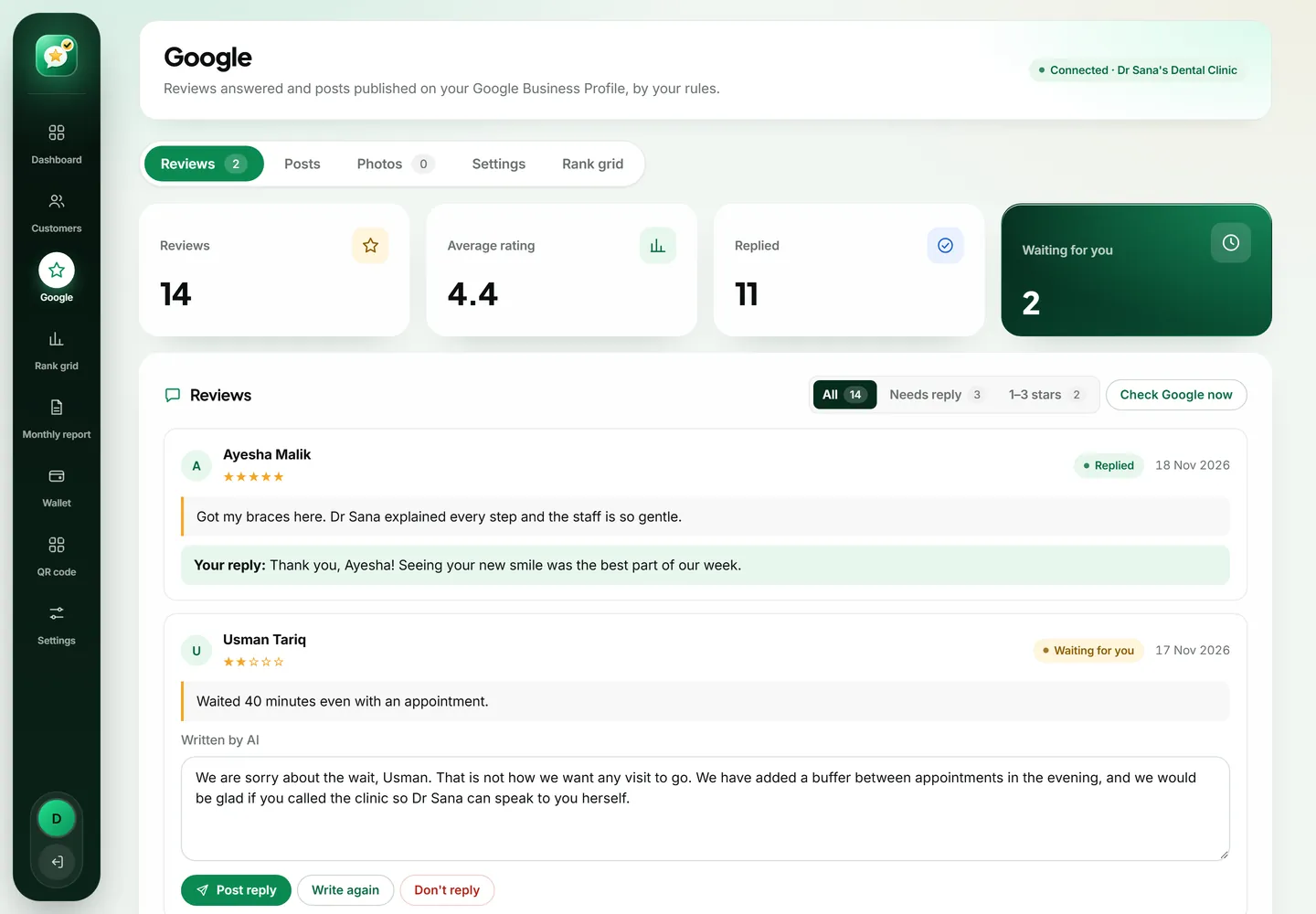
AsanReview connects to your Google Business Profile, checks for new reviews about every 20 minutes, and uses AI to write a reply for each one. You can approve every reply before it is published, or set rules so that 4 and 5 star reviews are answered automatically while low ratings wait for you.
Replies that sound like the owner
The AI is given your business description, your area and your last few replies, so it does not repeat the same opening line. It handles 4 to 5 stars, 3 stars and 1 to 2 stars differently: thanks for the first, a fair answer for the second, and a calm apology with a way to reach you for the third.
You stay in control
- Approve mode: every reply waits for you. Edit it or publish with one tap.
- Automatic mode (Pro and Agency): reviews you choose are answered by themselves.
- Low-star reviews can always be held back for you to answer personally.
- Filters show all reviews, the ones waiting for a reply, and 1 to 3 star reviews.
Why replying matters more than most owners think
A review is written once and read hundreds of times. The person who wrote it sees your reply once. Everyone who looks you up afterwards sees it too, and they are judging something simple: is there a real person behind this business, and how do they behave when something goes wrong?
An owner who thanks customers by name looks present. An owner who answers a complaint calmly looks trustworthy. A wall of reviews with no replies looks like nobody is home. Most owners know this and still do not reply, because it is one more job at the end of a long day. That is the gap this feature closes.
How the reply gets written
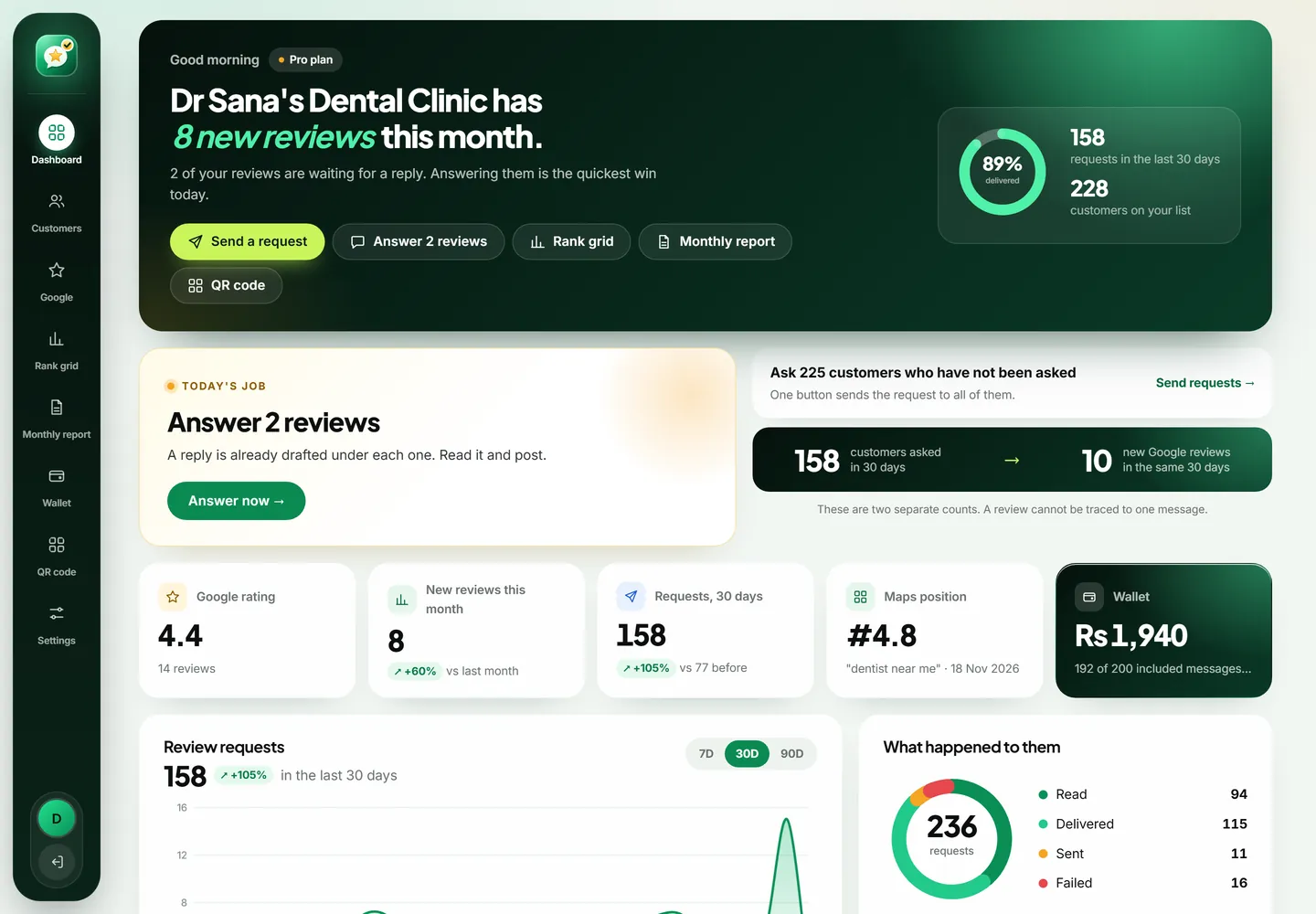
When a new review arrives on your Google Business Profile, AsanReview picks it up on its next check, about every 20 minutes. It gives the AI four things: the review itself, the short description of your business from Settings, your area, and your last few replies. The last part matters. Without it, every reply starts with "Thank you for your kind words" and customers notice the pattern.
The AI is told to sound like an owner, not a call centre. No "we value your feedback", no "we strive for excellence". Short sentences, the customer's first name, and one detail from what they wrote so it is clearly an answer to their review and not a template.
Three kinds of reviews, three kinds of replies
- 4 and 5 stars: a warm, short thank-you that picks up something specific, like the dish they liked or the staff member they named.
- 3 stars: thanks for the honesty, an acknowledgement of the part that was not good, and what you will do about it. No defensiveness.
- 1 and 2 stars: a brief, sincere apology for the experience they describe, no arguing, no blaming the customer, no excuses, and an invitation to contact the business so it can be put right.
- Stars with no text: a one-line thank-you. These still deserve an answer.
Approve mode and automatic mode
On the Starter plan every draft waits for you. You open the Google tab, read the draft, change a word if you want and press "Post reply". If you do not like it, "Write again" produces a different version. Most owners clear a week of reviews in a few minutes this way.
On Pro and Agency you can switch on automatic replies and set your own rule, for example: answer 4 and 5 stars by themselves, hold everything else for me. Many owners settle on exactly that. Happy customers get a quick thank-you without any effort from you, and anything that needs judgement still lands in front of a human.
What the AI will not do
- It will not argue with a customer or question their version of events.
- It will not offer refunds, discounts or gifts, because promises like that are yours to make.
- It will not share private details. This matters most for clinics: a reply never confirms that someone is a patient or mentions a treatment.
- It will not invent facts about your business. It works from the description you gave it.
- It will not post anything on a low rating without you, unless you have deliberately set it to.
Dealing with a review you believe is fake or unfair
Sometimes a review is from a competitor, a former employee, or someone who was never your customer. AsanReview cannot delete reviews and neither can you; only Google can, and only when a review breaks its policies. Open the review in your Google Business Profile and use "Report review".
While you wait, reply anyway. Keep it calm: say you cannot find a record of the visit and invite the person to contact you with details. Readers understand what that means, and a measured reply does more for your reputation than the bad review takes away.
A quick example
A bakery customer writes four stars: good taste, but a twenty-minute wait on Saturday. A weak reply says "Thank you for your feedback, we will improve." A good reply uses his name, agrees that Saturday was slow, and says one more person has been added at the counter on weekends. The second version tells every future reader that complaints here lead to changes. That is the tone AsanReview aims for, and you can edit any draft until it sounds exactly like you.
Who this is for
If you get two reviews a month, you can reply by hand. This feature earns its keep when reviews start arriving every few days, which is what happens once you ask customers regularly. It is also useful for owners who are comfortable speaking English or Urdu but do not enjoy writing it: the draft gives you a clean starting point, and the final say stays with you.
Questions people ask about AsanReview
Does replying to reviews help ranking?
Google says that responding to reviews shows you value your customers, and that review count and score are part of how local results are ranked. Replies themselves are best seen as trust for the next customer reading them.
Will the AI argue with an unhappy customer?
No. For low ratings it apologises briefly, does not blame the customer, and invites them to contact the business directly.
Which plans include it?
Starter includes AI replies that you approve. Pro and Agency can also publish replies automatically by your rules.