AsanReview feature
See where you rank on Google Maps, street by street, with AsanReview
Your Maps position changes with where the customer is standing. One number hides that. The rank grid searches from many points around your business and shows the position at each one.
Free plan, no cardJazzCash · EasypaisaRoman Urdu · Urdu · English
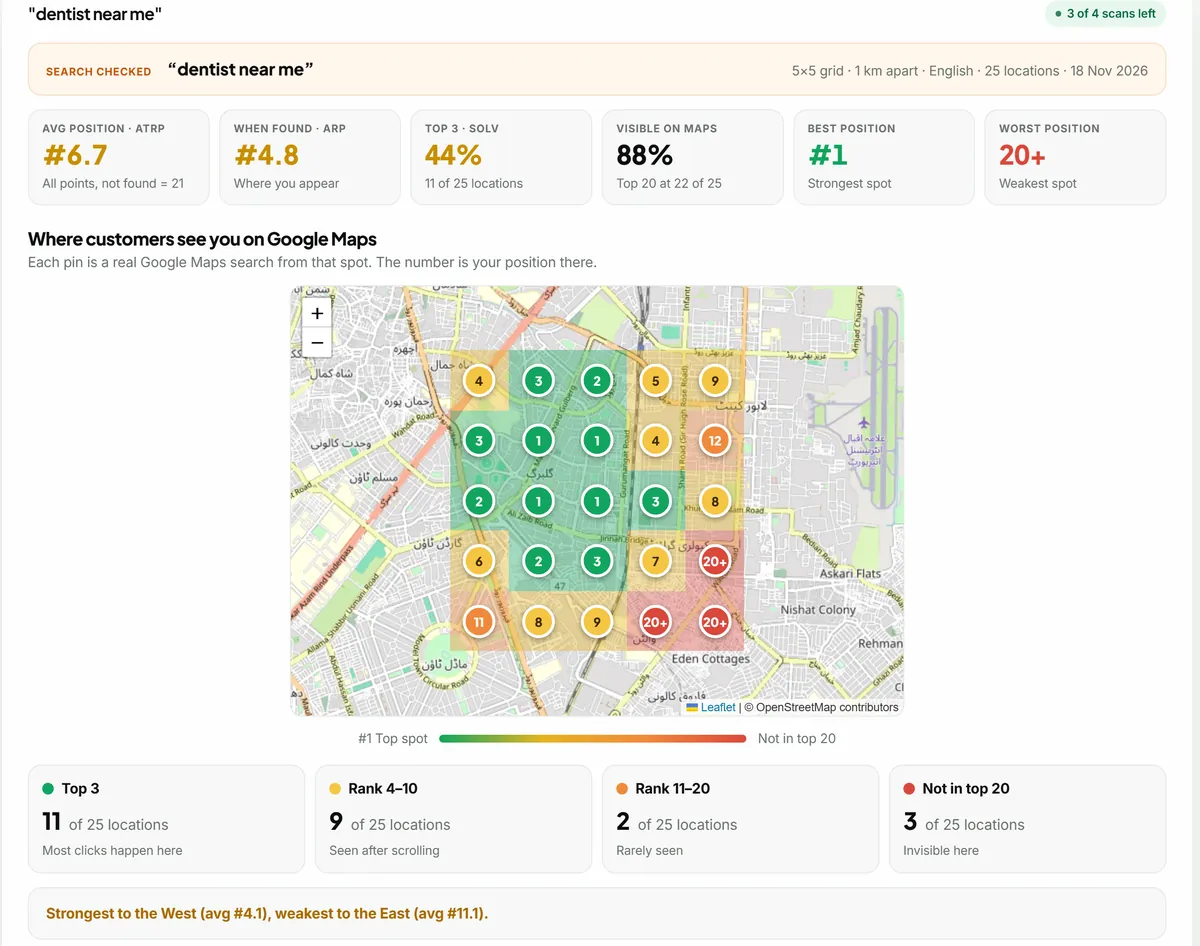
A rank grid (also called a geogrid) checks a keyword on Google Maps from a grid of points around a business, for example 5 × 5 points placed 1 km apart, and records the business's position at each point. AsanReview shows the grid on a map with average position (ATRP), average position where found (ARP), share of top-3 results (SoLV) and the competitors that rank above you.
What the report contains
- A map with a numbered, coloured pin at each search point.
- Six numbers: ATRP, ARP, top-3 share (SoLV), share of points where you are visible, best and worst position.
- You against the local market: position, review count, rating and photos, compared with the 10 strongest competitors.
- The top 20 businesses for that search, and who leads on reviews, rating and photos.
- Plain-language notes: where competitors beat you, what you do well, what to do next.
Share it
Every scan has a private link you can send to a client or partner, with a "Save as PDF" button. On the Agency plan the report carries your own brand name.
How the terms are defined
- ATRP (average total rank position): the average over every point; a point where you are not in the top 20 counts as 21.
- ARP (average rank position): the average over only the points where you appear.
- SoLV (share of local voice): the share of points where you are in the top 3.
The problem with "I am number three on Google"
Ask ten business owners where they rank and most will search their own keyword from inside their own shop. Of course they see themselves near the top: Google knows they are standing right there. Walk two kilometres away and search again, and the picture can be completely different.
Google Maps results depend heavily on where the searcher is. A dentist in Gulberg can be first for people in Gulberg and invisible for people in Model Town. One rank number hides all of that. If you are spending money or effort on your Google profile, you need to see the whole area, not the view from your own doorstep.
How a scan works
You choose a keyword, a grid size and the distance between points. AsanReview lays the grid over the map with your business in the centre and runs a real Google Maps search from each point, as if a customer were standing there. For a 5 × 5 grid that is 25 separate searches. Each one returns the top 20 businesses, and we record where you appear.
The result is drawn on a map: a numbered pin at every point, green where you are in the top 3, amber for 4 to 10, orange for 11 to 20 and red where you are not in the top 20 at all. In one look you can see where you are strong and where you disappear.
Choosing the grid
- 500 m apart: for dense areas where customers come from the surrounding streets, such as a bakery, pharmacy or salon.
- 1 km apart: a sensible default for most shops, clinics and restaurants in a city.
- 2 or 3 km apart: for businesses people travel to, such as a specialist doctor, a showroom, or a restaurant that delivers across town.
- 3 × 3 gives a quick picture with 9 searches; 5 × 5 gives the detail with 25.
Reading the numbers without a course in SEO
Three numbers sit at the top of every report. ATRP is your average position across every point, counting 21 for any point where you were not found. It is the harshest number and the most honest. ARP is the average only where you do appear, so it tells you how well you rank in the places you rank at all. SoLV is the share of points where you are in the top 3, which is where most of the clicks go.
A common pattern is a good ARP with a poor ATRP. That means you rank well nearby but are missing from large parts of the grid. The fix for that is different from the fix for ranking eighth everywhere, which is why seeing both matters.
Who is beating you, and why
Every scan also records the competitors. The report lists the top 20 businesses for that search with their average position, how many points they appeared at, their rating, review count and photo count. A "you against the local market" table puts your numbers beside the average of the ten strongest competitors and the leader.
This turns a vague worry into a specific gap. If the leader has 600 reviews and you have 90, you know what to work on. If your reviews are level but they have five times your photos, the answer is different. The report ends with plain notes: where competitors beat you, what you are doing well, and what to do next.
Tracking change over time
One scan is a photograph. The value comes from repeating it. AsanReview keeps every scan for each keyword and shows how the average has moved, so you can tell whether the reviews you collected last month changed anything. Scans can run by themselves through the month within your plan's allowance, or you can press "Scan now" after you have made a change.
Give changes time. Local rankings move over weeks, not days. A scan every two to four weeks per keyword is enough for most businesses.
Getting your location right
A grid is only as good as its centre. When you connect your Google Business Profile, AsanReview places the pin by itself: it reads the position from the profile, checks the listing on Google Maps, and compares the result against your address so a wrong pin is not accepted. You can always see the saved pin on the map and in the location card, check it on Google Maps with one link, and move it by tapping the map or pasting your Google share link.
For agencies and consultants
Every scan has a private link you can send to a client. They do not need an account. The page shows the map, the numbers, the competitor table and the notes, and has a "Save as PDF" button that prints one keyword per page. On the Agency plan the report carries your brand name. It is the kind of report that makes a monthly retainer easy to justify, because the client can see the area turning green.
Questions people ask about AsanReview
How big is the grid?
3 × 3 or 5 × 5 points, placed 500 m, 1 km, 2 km or 3 km apart.
How many keywords can I track?
3 keywords on Starter and 5 on Pro and Agency, each with a set number of scans a month.
Where do the results come from?
Each point is a live Google Maps search made from that exact position, in English.