AsanReview for restaurants and cafés
More stars on Google, more tables filled, with AsanReview
Hungry people search, look at the rating, and decide in seconds. AsanReview helps you ask every guest and delivery customer, and answer what they write.
Free plan, no cardJazzCash · EasypaisaRoman Urdu · Urdu · English
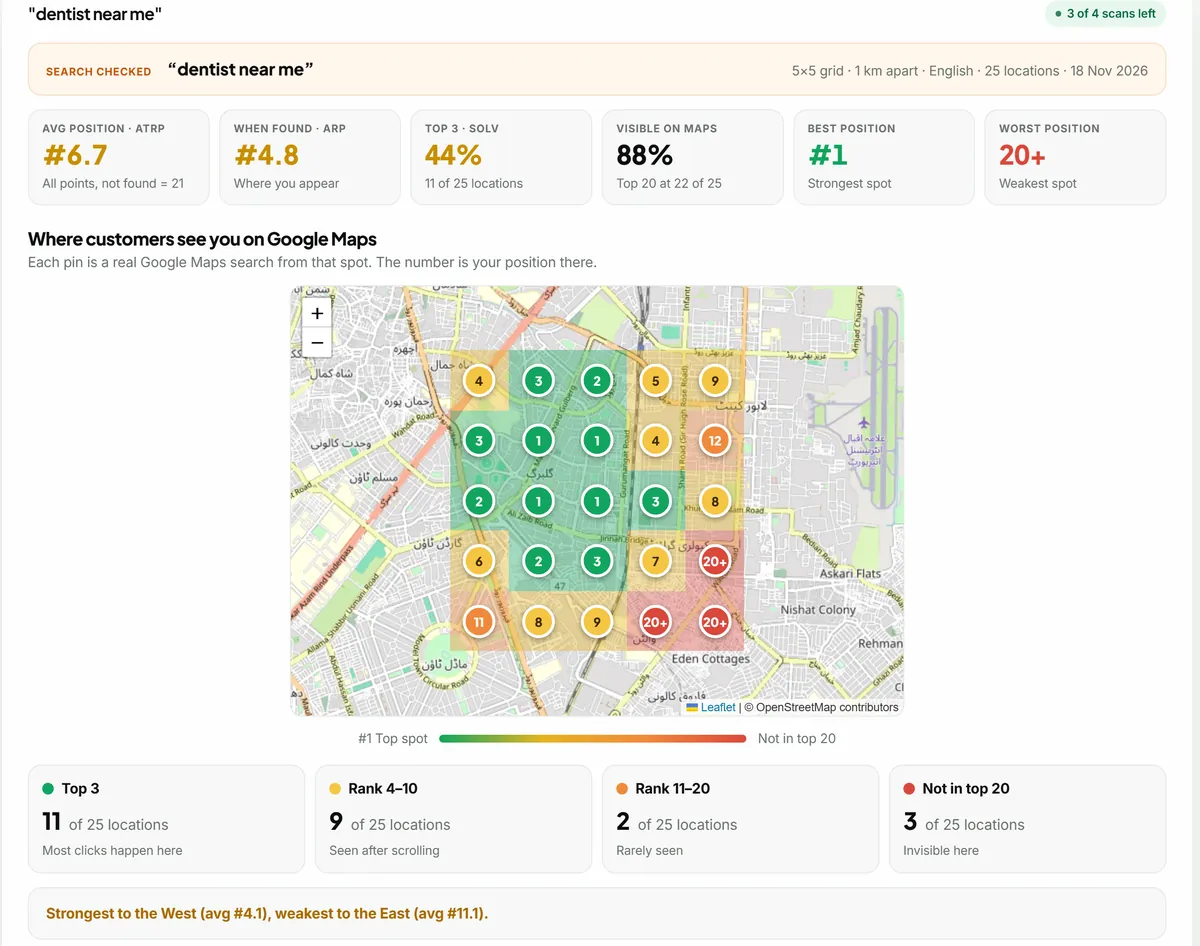
Restaurants increase Google reviews by asking guests soon after the meal on WhatsApp with a direct review link. AsanReview sends the request from your reservation or delivery list, replies to each review with AI, and shows your Google Maps position across your delivery area.
When to ask
An hour or two after the meal or delivery.
A message that works
Assalam o Alaikum {name}, {business} mein khana khane ka shukriya! Khana kaisa laga? Google par bata dein: {link}
Tips for restaurants and cafés
- Delivery numbers from your order sheet can be uploaded as an Excel file.
- A wider grid (2 or 3 km apart) shows how you rank across the area you deliver to.
- Answer a complaint about food or waiting time the same day.
Searches worth tracking on the rank grid
The Google Maps rank grid shows your position for each of these from every side of your area. See also how to get more Google reviews.
Hungry people decide in seconds
Nobody researches dinner for a week. Someone opens Google Maps, types "restaurants near me" or "best karahi", and looks at three things: the rating, the number of reviews and the photos. If your place shows 4.4 with 900 reviews and the one beside it shows 3.9 with 60, the choice is made before they read a single word.
This makes restaurants more dependent on reviews than almost any other business, and it rewards a steady flow. A review from last week about the food tells a diner what tonight will be like. One from 2022 tells them very little.
Dine-in, takeaway and delivery need different timing
- Dine-in: an hour or two after the meal, once the guests are home and still talking about it.
- Delivery: about an hour after the order arrives, when the food has been eaten.
- Catering and large orders: the next day, after the event.
- Avoid sending during the meal, and avoid late at night.
Where the numbers come from
Restaurants usually have numbers in more places than they realise: the reservation book, the delivery sheet, the order-taking phone, the POS export. Any of these can be typed in or uploaded as an Excel file. For dine-in guests without a booking, the waiter or cashier can simply ask when presenting the bill: "Can we send you a WhatsApp for feedback?" Most people say yes.
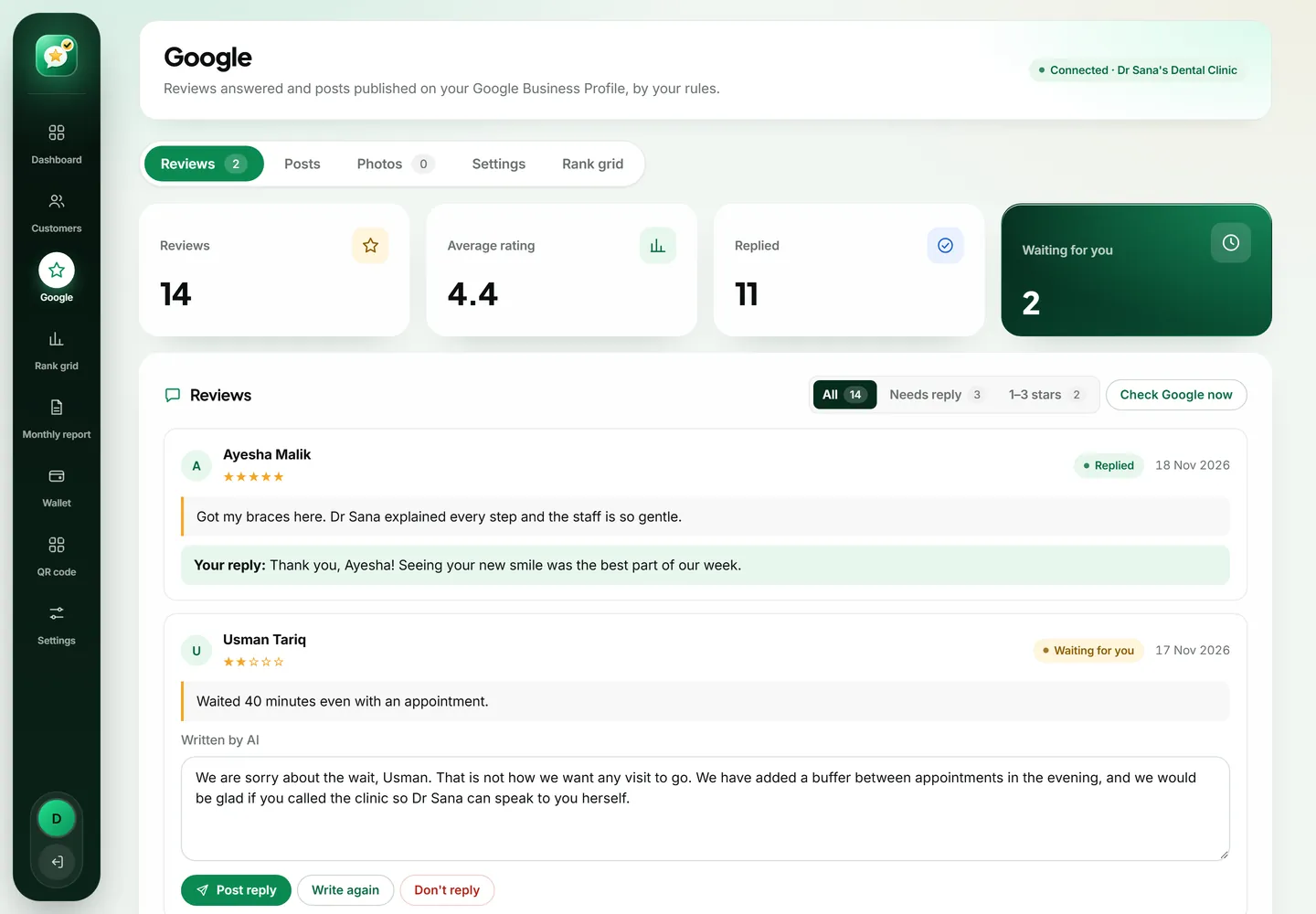
The complaint that will come, and how to answer it
Cold food, a late rider, a missing item, slow service on a Friday night. Every restaurant gets these. Reply the same day, by name, and keep it short. Apologise for the specific thing they mention, say what you have done about it if you can, and invite them back or ask them to call. Do not blame the delivery company or the rush.
People choosing a restaurant read the low-star reviews on purpose, to see the worst case. A decent reply under each one changes the worst case from "they do not care" to "they fix things".
Photos sell food
Upload real photos of your dishes, your seating and your shopfront. Phone photos in good light are fine. AsanReview picks one each time it writes a post, so a library of thirty or more gives variety: today the nihari, next week the family hall, then the new dessert. Avoid heavily edited or borrowed images; guests feel misled when the plate does not match the picture.
What to post about
- A dish of the week, with what makes it yours.
- New items on the menu.
- Ramzan, Eid and weekend timings.
- Family hall, private dining or catering, if you offer them.
- Deals that have a clear end date.
See your whole delivery area on the map
A restaurant's customers are spread across the area it delivers to. Run the rank grid at 2 or 3 km between points for a search like "biryani near me" and you will see where you show up and where a competitor owns the neighbourhood. Often a restaurant is strong on its own road and missing from a housing society ten minutes away that could be sending it orders every night. Knowing that tells you where to focus your requests.
More than one branch
Each branch has its own Google profile, its own reviews and its own neighbourhood. Treat them separately: a separate location for each, its own customer list and its own rank grid. Comparing branches side by side also tells you something useful about operations, since the branch with the lower rating usually has a real problem behind it.
Why your rating moves more than other businesses
A restaurant serves hundreds of people a week and every one of them has an opinion. That volume means your rating can shift within a month, in either direction. A bad weekend with a short-staffed kitchen can leave five angry reviews. The protection against that is a large base of ordinary, satisfied reviews, so a few bad ones barely move the average. You build that base only by asking on the good days too.
Getting staff on board
Waiters and cashiers are busy and will forget unless it is simple. Put one line in the closing routine: enter today's phone orders and reservations. If you use a POS that exports numbers, upload the sheet once a day instead. Share good reviews in the staff group; when a waiter sees his name praised, he starts mentioning the review to guests himself.
Food apps and Google are different audiences
Ratings on delivery apps help you inside those apps. Google reviews help you with everyone else: the family deciding where to eat tonight, the office ordering lunch directly, the visitor searching the area. Customers who order from you directly are the easiest to ask, because you have their number and they chose you without a discount.
Choosing a plan
A small café can start free from the counter phone. A busy restaurant with delivery will want Starter or Pro for automatic sending, since typing forty numbers a night by hand does not last. Pro adds automatic replies to four and five star reviews, which matters when you receive several reviews a day.
Start today, in about two minutes
Create a free account with your business name, your mobile number and your Google review link. Add the customers you served today and press send; each one receives your review link on WhatsApp. There is no card to enter and no trial that runs out. When you want sending, replies and posts to run by themselves, the paid plans start from a single location, and you can go back to Free whenever you like.